📊 Settings
SmashBotAI works out of the box, but we do have some settings you can set.
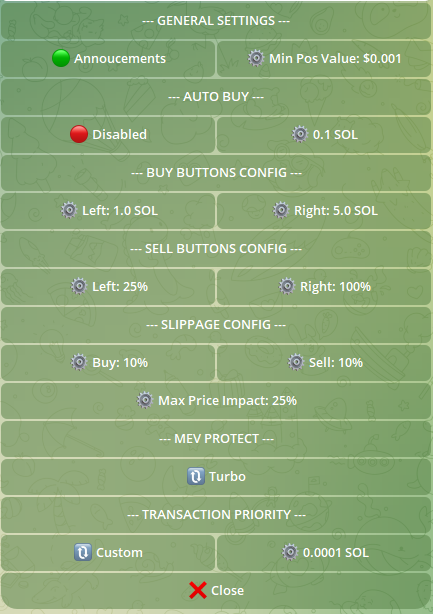
General Settings
SmashBot Announcements: Occasional announcements. Tap to toggle.
Minimum Position Value: Minimum position value to show in portfolio. Will hide tokens below this thresh hold. Tap to edit.
Auto Buy
Immediately buy when pasting token address. Tap to toggle.
Set how much you wish to auto buy.Tap to edit.
Buttons Config
Customize your buy and sell buttons for buy token and manage position. Tap to edit.
Slippage Config
Customize your slippage settings for buys and sells. Tap to edit.
Max Price Impact is to protect against trades in extremely illiquid pools.
Transaction Priority
Increase your Transaction Priority to improve transaction speed. Select preset or tap to edit.
MEV Protect
MEV Protect accelerates your transactions and protect against front runs to make sure you get the best price possible. Turbo: SmashBotAI will use MEV Protect, but if unprotected sending is faster it will use that instead. Secure: Transactions are guaranteed to be protected. This is the ultra secure option, but may be slower.